
18 February 2026
If you lost footage after a crashed drone incident, this does not mean the files are gone. A hard impact can interrupt recording and make clips disappear from the memory card, or leave files visible but unable to open due to a damaged video structure. The next steps depend on what happened to the files. We explain which tools to use in each case, step by step.
What to Do Immediately After a Drone Crash
First, let’s talk about how drone cameras record video, because this explains what goes wrong during a crash. A drone does not save a finished file all at once. It writes video data gradually while the camera runs, and the file becomes usable only after recording stops normally and the camera has time to “close” it. That final step adds the metadata that video players need to read the clip properly.
A crash interrupts this process. Power cuts before the file is completed. The video data may still be on the card, but the file is “unfinished”. That is why drone footage may not appear at all or may exist but fail to open. Different drone models handle this in slightly different ways, but the situation after a crash is usually similar.
Regardless of which case you face, here is what you should do:
-
We usually advise one thing first. Stop interacting with the drone. Do not power it back on to check the footage. Do not reconnect it to an app. Every new write to the memory card reduces the chance of recovery.
-
Remove the SD card and set it aside. Use a card reader when you access it later. Avoid inserting the card back into the drone, even for a quick test. From our experience, drones may rewrite metadata or cache files automatically after a crash.
-
The next step is to identify the type of damage. Use a card reader and connect the SD card to a computer. Do not format or repair it when prompted.
At this point, the card will usually fall into one of two categories:
-
If you cannot find the files at all, or the folders look empty, this usually points to logical damage or deletion. The data is no longer visible to the system, but it often still exists on the card. In this situation, data recovery software is usually the right starting point.
-
If the files are visible but refuse to play, it typically means the video header is damaged. The recording data is still present, but the file lacks the information needed to open it, and video repair software is required to rebuild the file structure.
How to Recover Deleted Drone Footage with Software
First, let’s start with the situation when files no longer appear on the card or folders look empty. Our standard approach starts with recovery software, and we usually rely on Disk Drill for this.
We rely on it for a few reasons. It is great for DJI file recovery and supports modern drone formats like MP4 and MOV. We also like two features that can be especially important after a crash: Advanced Camera Recovery (designed to retrieve footage created by drones and action cameras) and the Byte-to-byte backup option, which lets you create a full image of the card and scan that image instead of the card itself. That helps a lot when the SD runs slow or disconnects.
You can absolutely use other tools you prefer to recover deleted files from an SD card. The overall recovery flow stays similar across most apps.
Here is how to do drone data recovery with Disk Drill:
-
Download and install Disk Drill on your computer.
-
Insert the card into a reliable reader and connect it to your computer.
-
Open Disk Drill and wait until the card appears in the drive list.
-
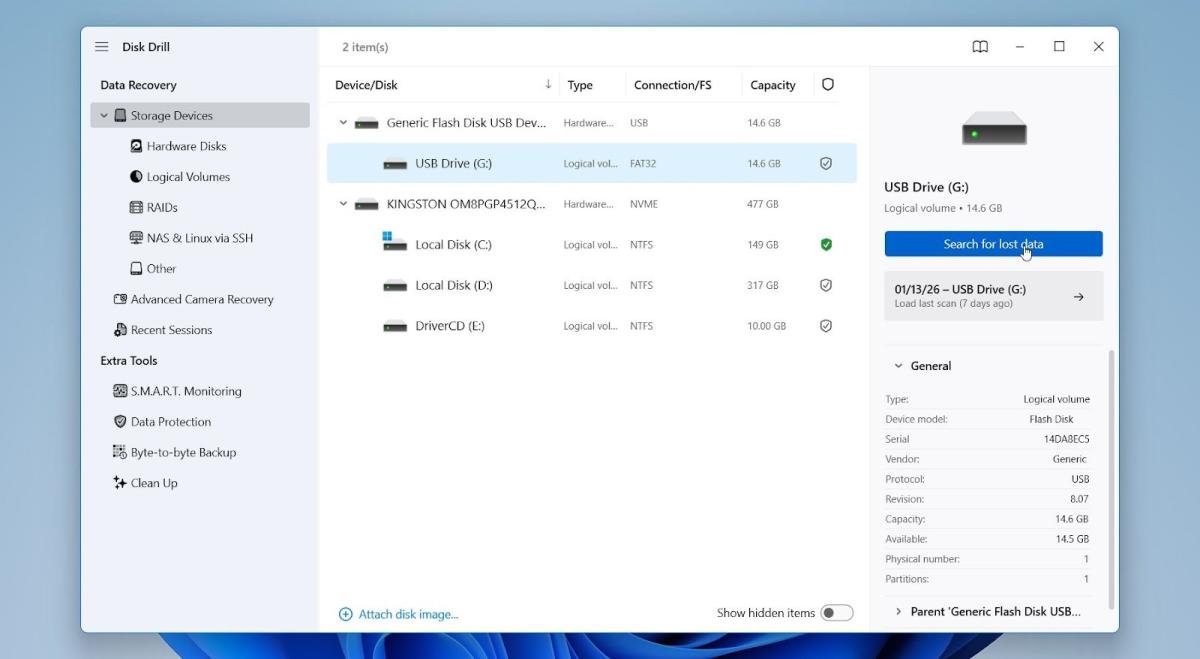
In the main Disk Drill window, select the SD card from the list of available drives. Click Search for lost data.
-
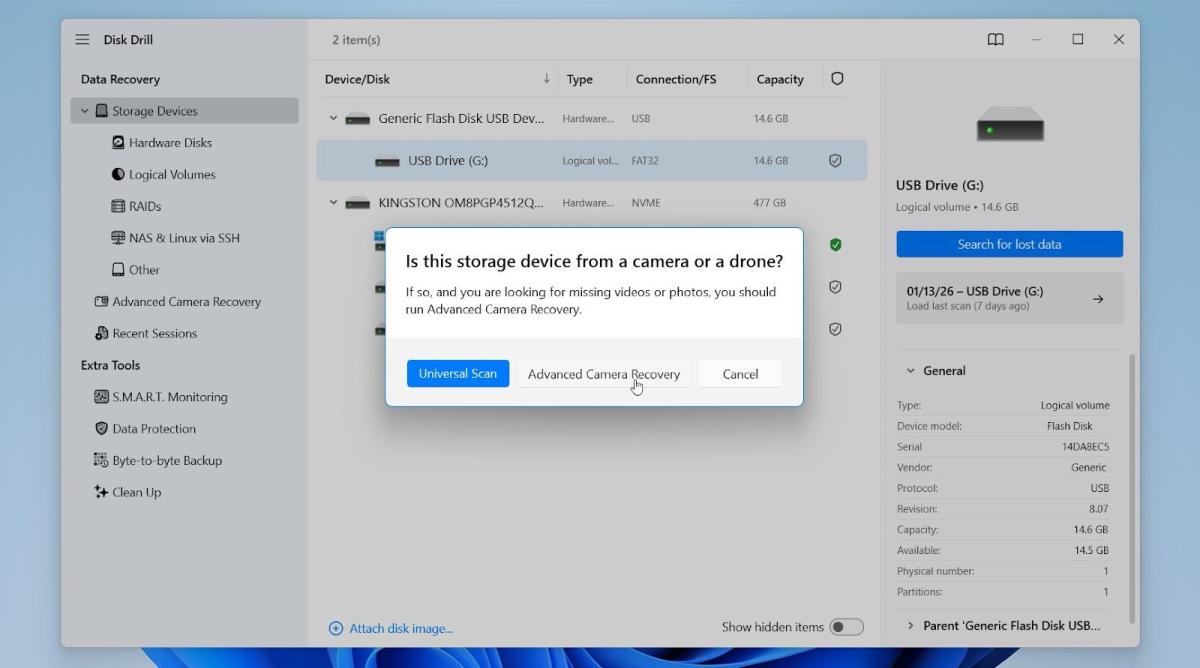
Choose Advanced Camera Recovery rather than a Universal Scan. In our experience, this mode works better for drone footage because it is designed to handle fragmented video files.
-
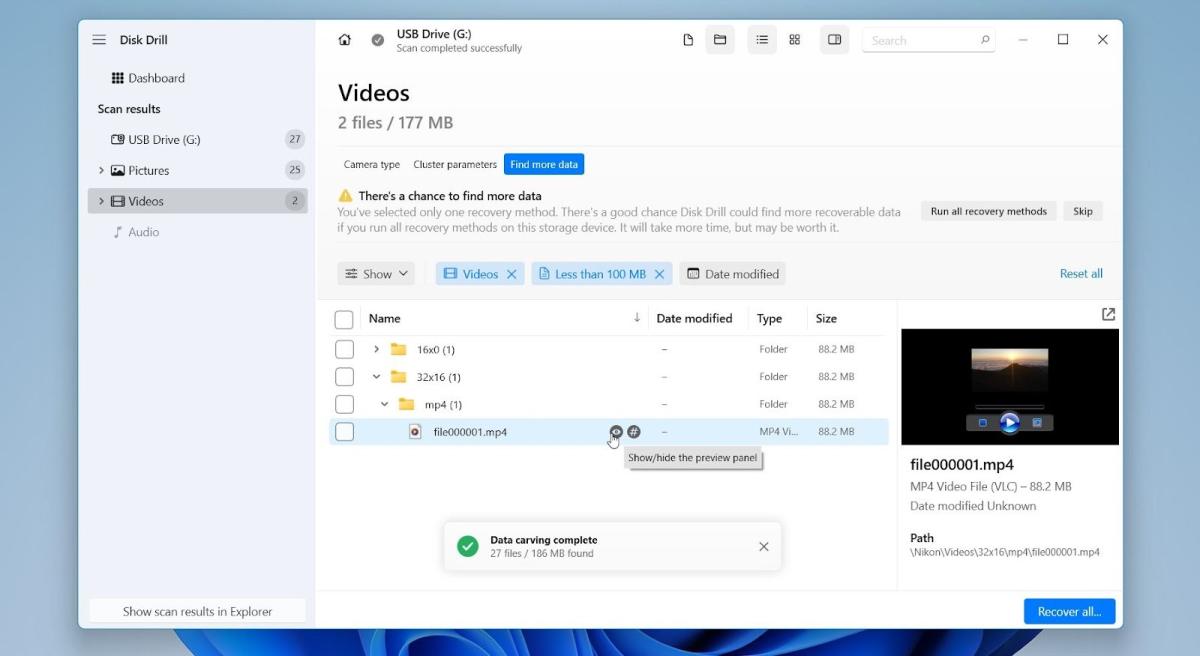
Once files appear, click Video in the filter panel. Then use the file type filter to focus on MP4 and MOV files. Sorting by file size often helps locate longer clips.
-
Preview files. A successful preview indicates the file structure is intact. But a failed preview does not always mean the file is unusable, especially with crash-recorded drone videos.
-
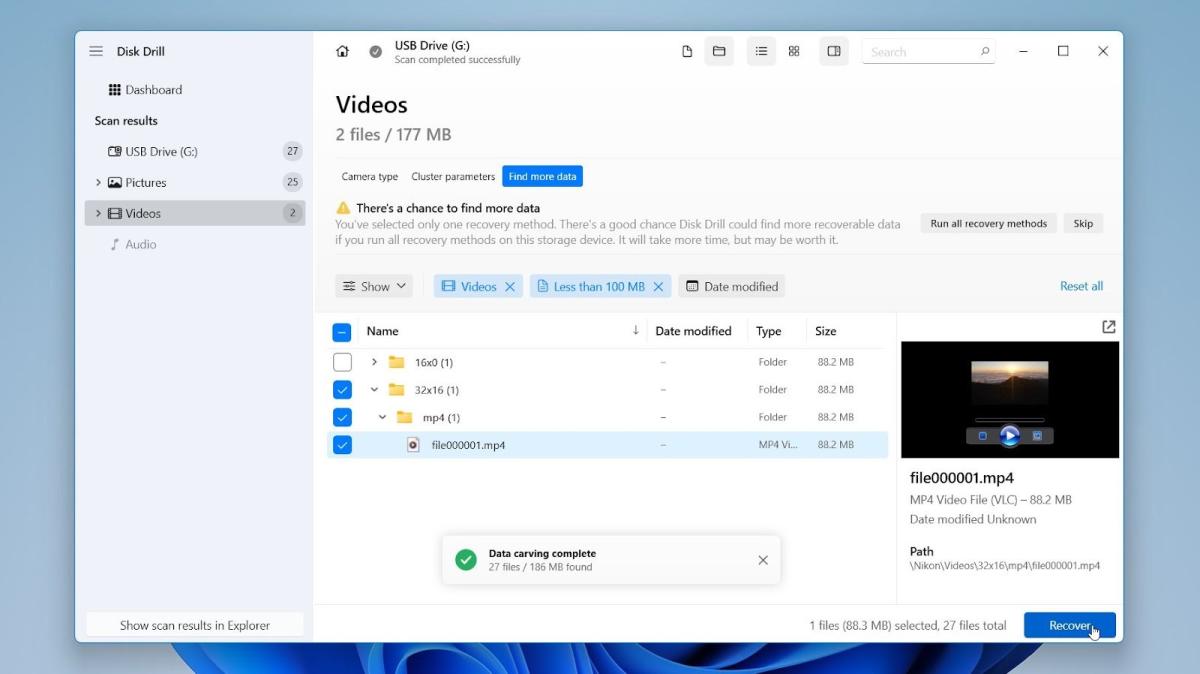
Check the boxes next to the files you want and click Recover.
-
When prompted, choose a location on your computer or an external drive and click Next. Do not save recovered files back to the SD card.
After recovery, do a quick check. Open a few files and see how they behave. In crash-related cases, recovered videos may still appear broken or refuse to play. That does not mean recovery failed. When that happens, the next step is video repair, which we cover in the following section.
If recovery software does not find your files at all, or the scan returns only unusable results, it is time to pause. Recovering data from a corrupted memory card can be tricky. If you try multiple methods and they don't work, further DIY attempts can make things worse. Our team generally advises consulting a professional data recovery service to review the card and explain your remaining options.
How to Fix Unplayable Drone Videos
Now, let’s move on to video repair, which is often possible with specialized software and online services. Video repair tools rebuild missing headers and internal indexes. Here is a couple of options we recommend trying:
Option 1: Fix drone videos with VLC (quick attempt)
In real cases, a crashed drone often leaves the last recorded clip unplayable. On Reddit, users report corrupt MP4 files after a crash and discuss repair attempts with VLC and other tools. From our experience, this method can work in some cases.
VLC can convert damaged video files to a new format, which sometimes restores basic playability. It does not work in every case, but it is worth trying first because it is fast and non-destructive.
How to try it in VLC:
-
Open VLC Media Player
-
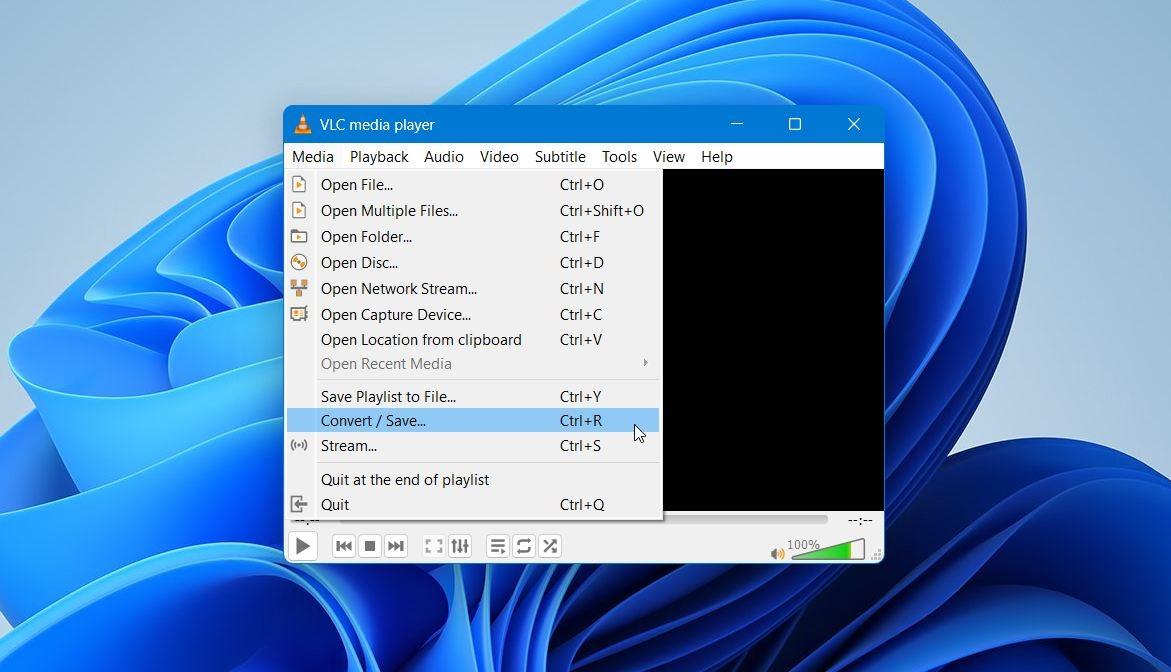
Click Media, go to Convert / Save
-
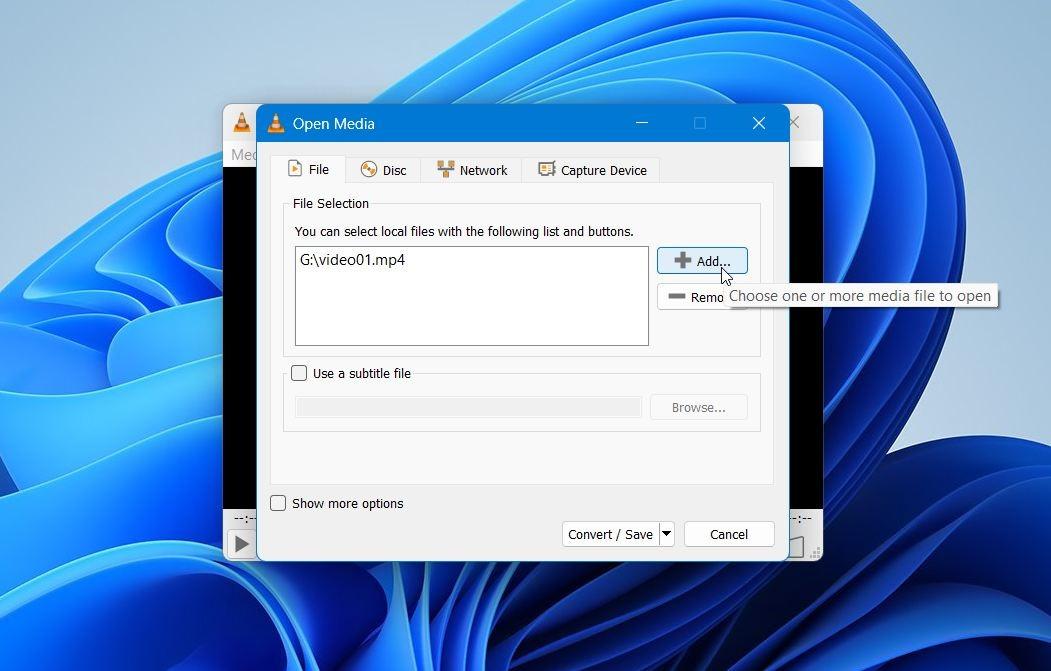
Click Add and select the broken video file.
-
Click Convert / Save.
-
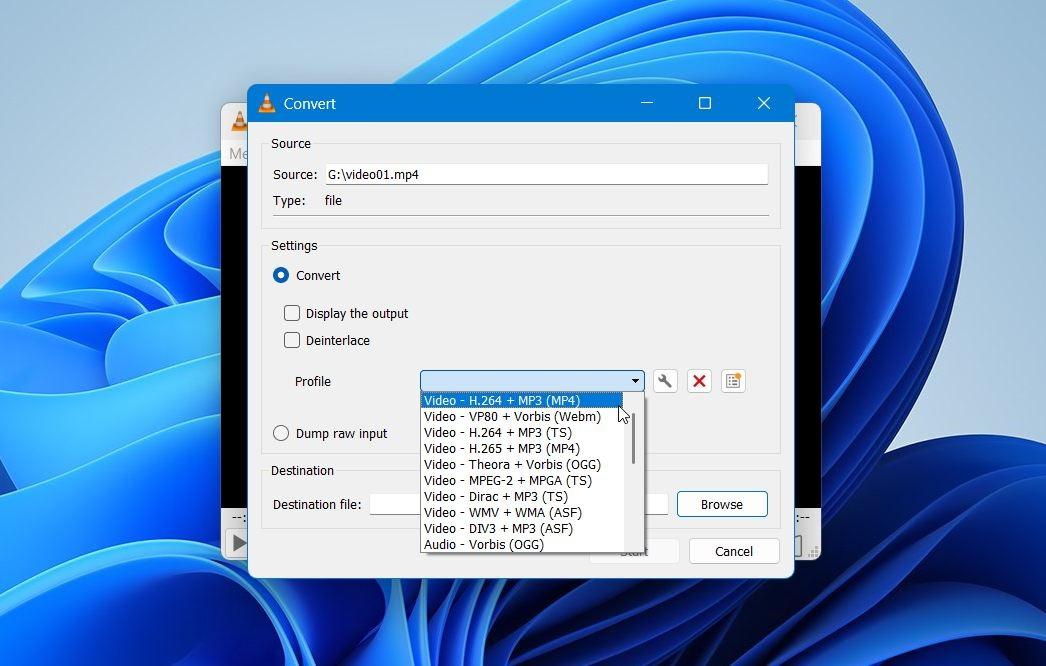
Under Profile, choose Video – H.264 + MP3 (MP4).
-
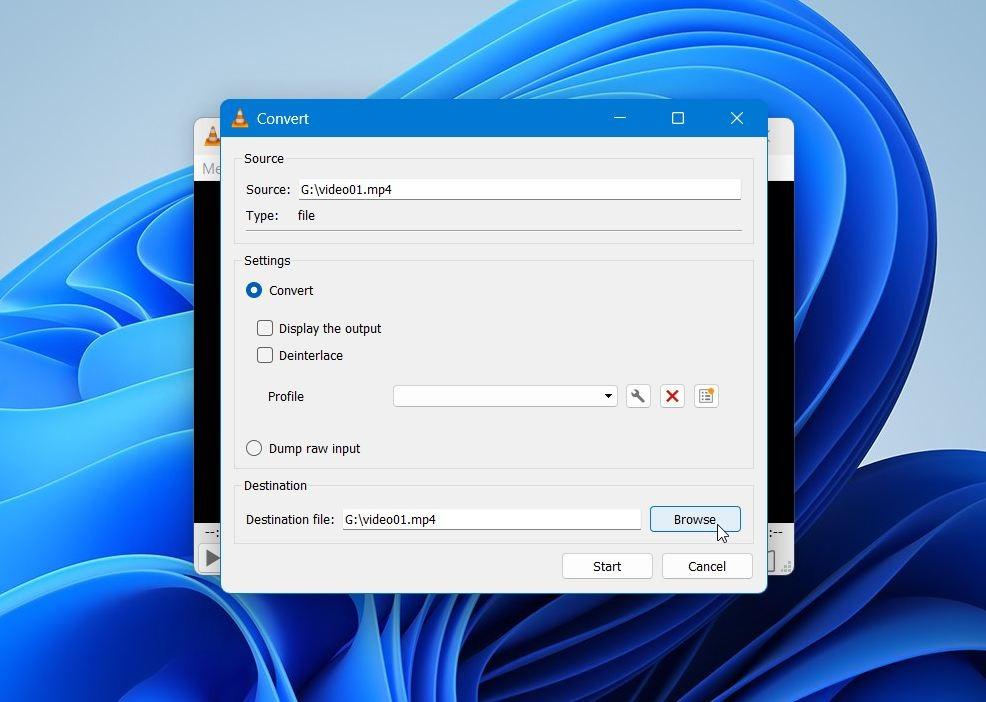
Click Browse, choose a destination, and enter a filename.
-
Click Start and wait for the process to finish.
This method works best when the file structure is only partially damaged. From our experience, results vary with crash-recorded MP4 and MOV files, but it is a reasonable first step.
Option 2: Fix drone videos with Clever Online Video Repair
When VLC fails, dedicated repair tools usually perform better. Online video repair services work well when the file exists but has a broken header. We often see good results with Clever Online Video Repair, especially for drone footage recorded in MP4 or MOV format.
How the repair process works:
-
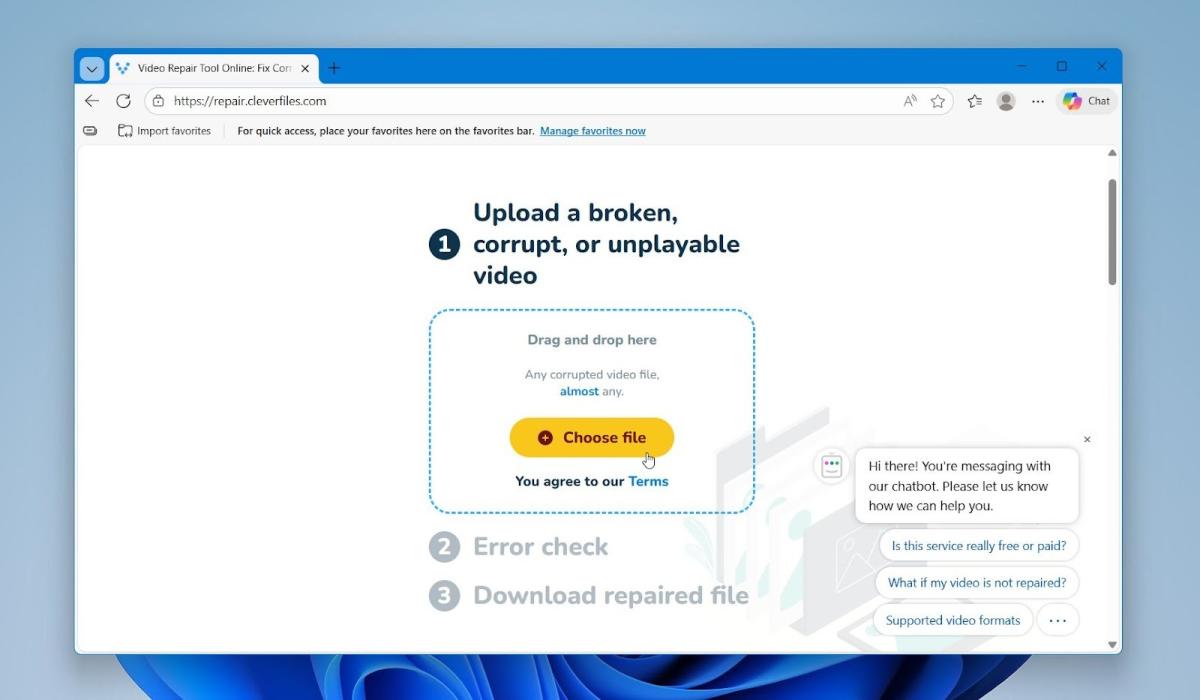
Open the online repair page.
-
Click Choose file to upload the broken drone video.
-
The service will error-check and fix the file automatically.
-
After that, you can preview and download the repaired version if the process succeeds. Or Upload a healthy reference video recorded with the same drone and settings for better results.
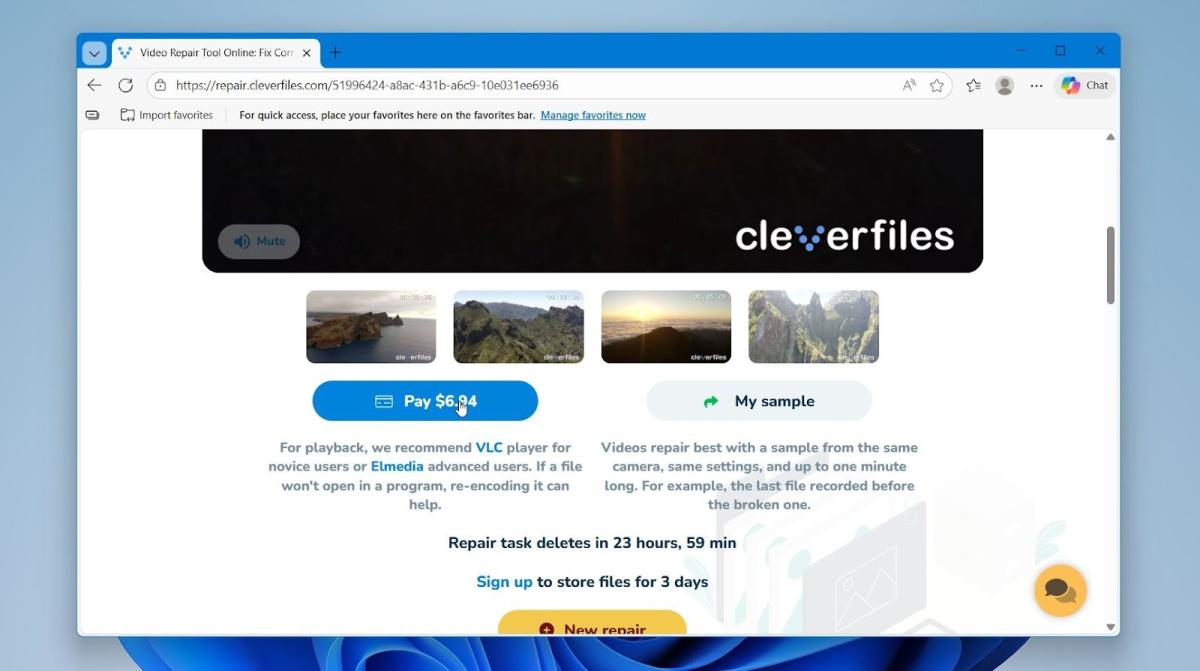
The reference file should match the same camera model, resolution, frame rate, and codec, since it gives the repair engine a correct template to rebuild the missing structure. A healthy reference video is not mandatory - repair can still succeed without it. However, a matching reference usually increases the chances of a successful result.
We also want to remind you that repair tools rely on existing data. When large parts of the video stream are missing or overwritten, repair may not succeed. Repeated failed attempts usually signal more serious damage.
Closing Notes
We hope our article helped you understand what happens to drone footage after a crash and find a useful method or tool for your situation. For the future, simple habits make a difference: check battery levels, firmware updates, GPS status before flights, and copy footage to at least two locations after each session. Regular backups reduce the impact of crashes and turn a recovery task into a manageable one.